Changelog
Stay up to date with the latest features, improvements, and fixes in the Pergola CLI. For upgrade instructions, please see our installation guide.
v2.3.2 — October 23, 2026
- The MCP server can now authenticate with an Access Key via the
PERGOLA_ACCESS_KEYenvironment variable. - Minor fixes and improvements.
v2.3.1 — September 4, 2026
- Upgraded libraries and dependencies.
- Minor fixes and improvements.
v2.3.0 — July 6, 2026
-
AI Agent support with built-in MCP server. Makes Pergola available via MCP tools so AI agents (Claude, Cursor, VS Code, …) can drive Pergola directly from your IDE, or as part of agentic workflows.
See the Agentic DevOps tutorial for further details.
-
Ingress configuration per Stage, for a more granular and secure control how your applications are served on the network:
pergola add config-ingress -hpergola list config-ingress -hpergola add config-ingress-auth -hpergola list config-ingress-auth -hSee the CLI documentation for more options and details.
-
Manage access to your private (internal) Git repositories on a per Project level, via personal access tokens (PAT), or via SSH:
pergola create pat -hpergola list pat -hpergola create ssh -hpergola list ssh -hSee the CLI documentation for more options and details.
-
Bugfix: Adding configuration data (i.e. environment variables) with
=, or,-separated values were getting rejected withinvalid env format.
v2.2.3 — May 13, 2026
- Bugfix: Adding config-data was failing when the
--envkey or value contained an=. - Upgraded libraries and dependencies, plus minor improvements.
v2.2.2 — February 24, 2026
- Upgraded libraries and dependencies.
- Minor fixes and improvements.
v2.2.1 — May 14, 2025
- Bugfix: Adding multiple identities to the same config was overriding existing ones.
- Bugfix: Some commands were requesting the project flag even though a default project was configured.
- A few more minor fixes and improvements.
v2.2.0 — February 20, 2025
-
Manually start/stop components:
pergola start component -hpergola stop component -hSee the components reference for more details.
-
Back up all persistent data for a complete stage and restore at any time:
pergola list backups -hpergola create backup -hpergola restore backup -hSee the backups documentation for more details.
-
Trigger builds automatically when there are code changes pushed to Git:
pergola list auto-builds -hpergola add auto-build -hpergola remove auto-build -h -
Automatically push new releases whenever there is a successful build, configurable per stage and Git branch:
pergola list auto-releases -hpergola add auto-release -hpergola remove auto-release -hSee our Automated CI/CD tutorial for more details.
-
Use the CLI with access keys, for scenarios like running scheduled (unattended) scripts or batch scripts triggered by external systems for automation:
# managepergola create access-key -hpergola list access-keys -hpergola enable access-key -hpergola disable access-key -hpergola delete access-key -h# usage examplemy_accesskey=$(obtain_pergola_accesskey_from_some_secret_place.sh)pergola <command> <options> --access-key=${my_accesskey}See the access keys documentation for more details.
v2.1.1 — October 17, 2024
- Minor fixes and improvements.
- Security: Upgraded dependencies and applied security patches.
v2.1.0 — May 21, 2024
-
Show code changes since the last build:
# commits within main_b3 since last buildpergola list commits main_b3 -p myproject# helppergola list commits -h
-
Show potential vulnerability issues (security scan results) per build:
# summary per build (main_b3)pergola list vulnerabilities main_b3 -p myproject# issues per component (api-service)pergola list vulnerabilities main_b3 -c api-service -p myproject# details and recommendations per issue (CVE-2024-2511)pergola list vulnerabilities main_b3 -c api-service --id CVE-2024-2511 -p myproject# helppergola list vulnerabilities -h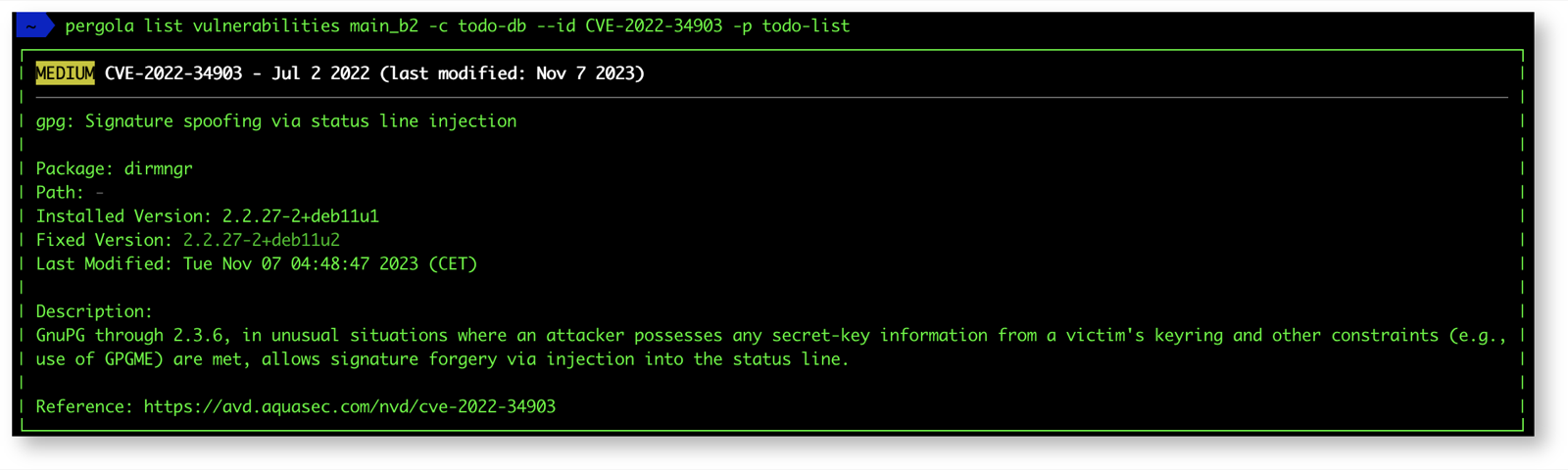
-
Follow/stream log files (like
tail -f), for example to monitor events on a specific stage while testing or troubleshooting:pergola logs stage dev -p myproject --follow -
And several improvements and fixes.
v2.0.2 — February 27, 2024
- Bugfix: Adding entries to a new (not yet existing) configuration was causing an error message instead of creating one as expected.
- More robust connection handling in
local-connectandexeccommands when running on unstable (e.g. remote, mobile) networks. - Minor improvements in error handling.
v2.0.1 — September 26, 2023
- Bugfix: Fixed connection drops in long-running
local-connectsessions.
v2.0.0 — September 19, 2023
A complete rework of the CLI, rewritten in Go for increased stability across operating systems and architectures, better performance and maintainability. Before installing CLI v2, please check the Migration Guide first.
CLI v2 isn't just a rewrite — it also brings new features:
-
Connect to your running components from your local environment for troubleshooting, debugging or any other operational purpose, without requiring an ingress:
# establish port-forwarding from your local machine to a port of a running componentpergola local-connect -h# execute commands in or shell into your running componentpergola exec -h -
Creating a stage now accepts a link to an Outpost:
pergola create stage <stage> --outpost-uri "pergola:outpost:12345678-90ab-cdef-0987-6543210fedcb" -
Retrieve project-level notifications:
pergola notifications project -h -
Add a member to a project as "owner":
pergola add member <member> --role "owner" -
Archive and restore projects and stages:
# if project has stages, it will be archived firstpergola delete project -h# and can be restored during retention periodpergola restore project -h# list archived projectspergola list projects --archived# will archive the stage firstpergola delete stage -h# and can be restored during retention periodpergola restore stage -h# list archived stagespergola list stages --archived -
Delete unused configuration on a stage:
pergola delete config -h
v1.1.5 — January 25, 2023
-
Auto-completion for:
- commands, e.g.
push release,add config-data,list component - options, e.g.
--project,--build,--branch - resources, e.g. stages, configurations, builds
Supports bash, zsh and tcsh. For installation and configuration, see the CLI documentation.

- commands, e.g.
-
Bugfix: Fixed sorting in builds and releases.
-
Security: Upgraded libraries for encryption and secure token handling.
v1.1.4 — August 19, 2022
-
Validate project manifests (
pergola.yaml) locally on your file system to find bugs and get hints before pushing:pergola validate manifest /path/to/local/pergola.yaml -
Set and reset your default project, applied when
-pis omitted, managed in local CLI configurations:pergola list cli-configpergola set cli-config -hpergola use cli-config -hpergola remove cli-config -h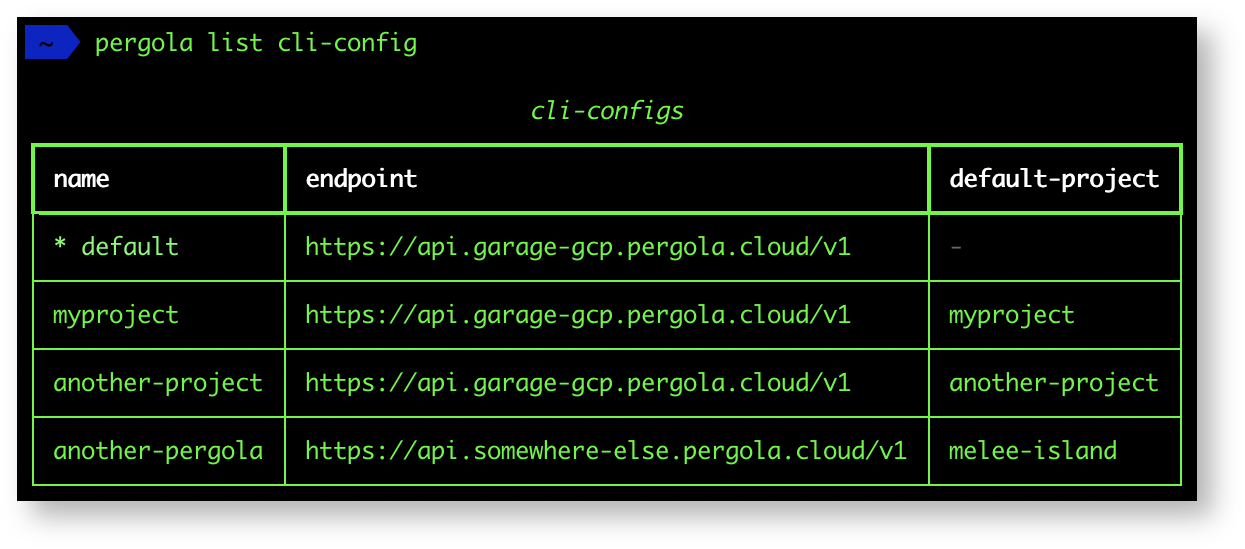
-
List all public projects, also those you are not a member of (can be silently disabled by the backend):
pergola list project --all -
Bugfixes and improvements.
v1.1.3 — April 14, 2022
-
Restart a specific component without deploying:
pergola restart component -h -
Suspend/resume a stage:
pergola suspend stage -hpergola resume stage -h -
Manage workload identities per stage:
pergola list config-identity -hpergola add config-identity -hpergola remove config-identity -h -
Access to build and runtime logs:
pergola logs build -hpergola logs stage -hpergola logs component -h -
Provide an endpoint option during login:
pergola login --endpoint https://api.myenv.pergola.cloud -
Basic CLI info for retrieving version and backend information added (
pergola info). -
Improved component status with detailed backend monitoring data, including scheduling and instance runtime state.
-
Added
add/remove config-datato simplify config handling; deprecates the existingset/update config-data. -
Bugfix: Config-data values containing an equal sign (
=) were truncated:pergola set config-data myconf -s dev --env db_conn_str='dbname=mydb user=foo password=bar' -p myproj
v1.1.2 — February 21, 2022
list componentnow contains runtime status and deployed ingresses.- Support for HTTP proxy and self-signed certificates.
v1.1.1 — January 13, 2022
- Minor fixes and improvements.
v1.1.0 — January 12, 2022
-
Manage via CLI:
- projects and stages
- configurations per stage
- project members for collaboration
- builds
-
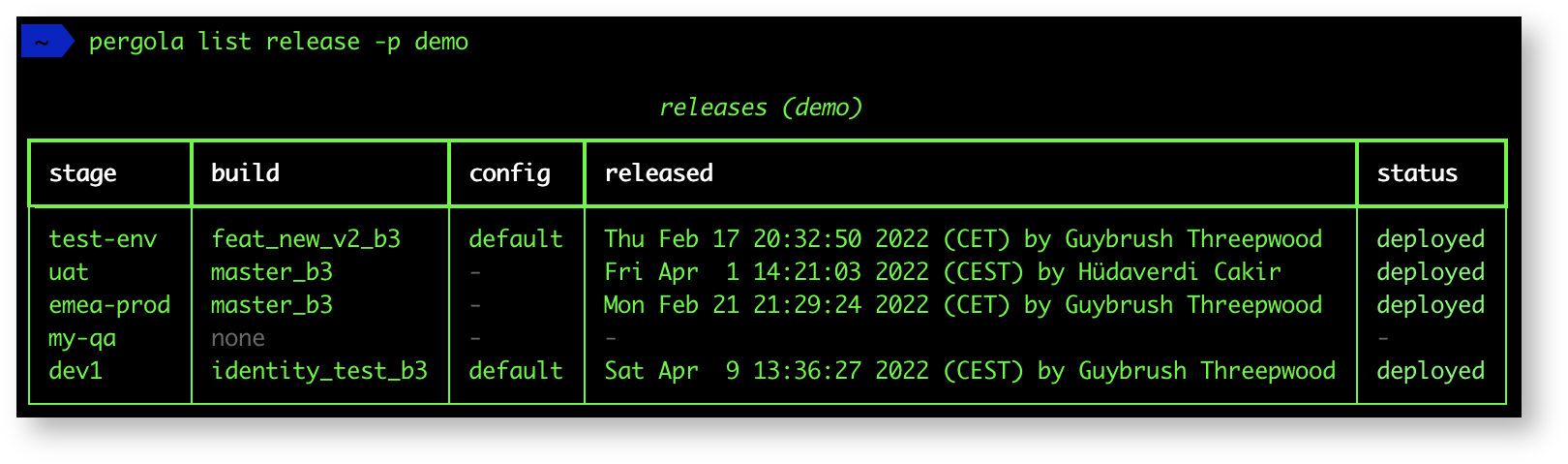
Access via CLI:
- components running on a stage and their status information
- release history
-
New optimised and rich text output formats.
-
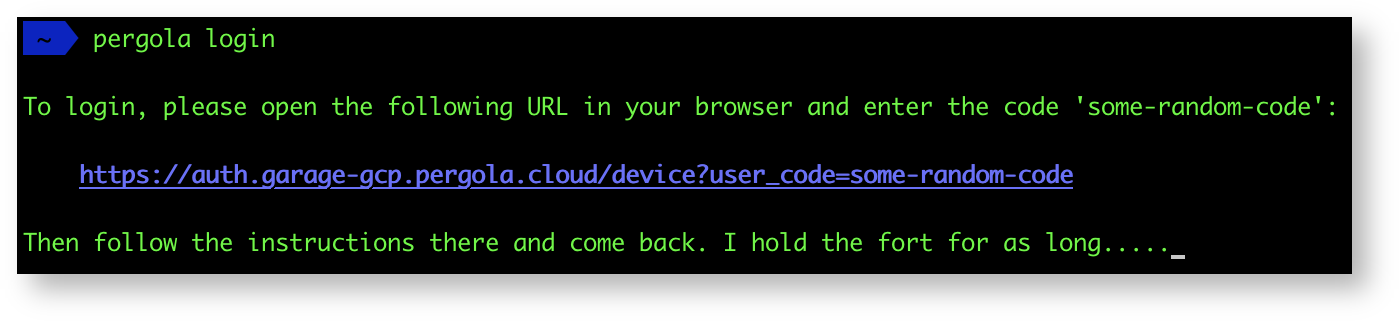
Support for SSO integration via device flow.
v1.0.4 — November 4, 2021
- Minor fixes and improvements.
v1.0.3 — May 11, 2021
- Minor fixes and improvements.
v1.0.2 — December 7, 2020
- Minor fixes and improvements.
v1.0.1 — July 28, 2020
- Minor fixes and improvements.
v1.0.0 — July 12, 2020
Initial release.